Step 1 – generate a random birthday
To deal with birthdays, I'm just going to use the day of the year.
So, rather than 1 January, it'll be Day 1, and 31 December will be Day 365.
This makes things a lot simpler to do!
- Open IDLE and go File > New File to create a blank programming window
- Start with import random. This tells Python you're going to need to deal with random numbers
- Then add a title and a blank line because it looks nice
- Then use date = random.randint(1, 365) to create a random number between 1 and 365
This will give us a totally random birthday
We'll store this in a variable called date - Then print the date
- Save your program in your OneDrive. Call it something like "birthdays"
- Run your program to check it works (Run > Run module)
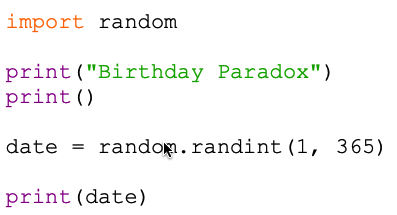
You should get a random number between 1 and 365
If there's an error, check your typing – the word randint is a tricky one to spell